Want to work together?
Currently accepting new projects and technical troubleshooting.
Fill out the form below and I will get back to you within 2 business days.
Having spent years working inside a 4x4 automotive store with 100’s of vehicles, the site I inherited was storing key product and vehicle information in tags.
Things like Make, Model, Series, Year and Spec, which were being used to power collections and for store merchandising.
This was working fine, however an issue became apparent after several customer service calls highlighted that certain vehicles did not appear in a homepage vehicle selector.
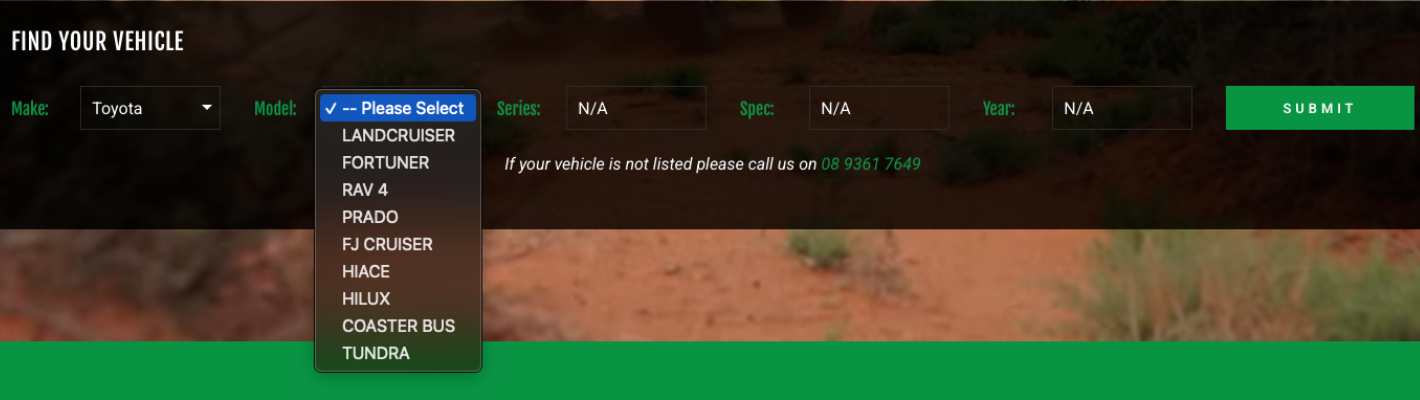
After looking further under the hood, I could see that the homepage vehicle selector was relying on the tag data.
I did some googling and found some articles that referenced a Shopify limitation when using collection.all_tags. It could only return up to a maximum of 1000 tags on a given page.
The problem with this wasn’t the amount of vehicles in the store, it was that with the combination of tags for Make, Model, Series, Spec and Year, it wasn’t long before the 1000 limit would be hit.
The exact issue that was causing certain vehicles to not display in the dropdown. They were being silently dropped by the storefront and not shown to customers.
Even more interesting was there was no real pattern to which vehicles were being dropped from the dropdown. I knew this was a big issue, as missing vehicles meant customer friction to finding their vehicle and higher customer service queries.
There had to be a better way to structure the data…
After looking further at the original code, I could see the drop downs were using the tag data to build a JSON object. This led to the first solution. I experimented manually updating the JSON data to include the missing vehicles.
Whilst this worked initially, it became very clear early on. This was a bandaid solution. Manually maintaining a JSON list each time new makes and models were released was an operational headache.
Wrangling nested JSON objects, maintaining large amounts of vehicle data in plain text and making changes and hoping it doesn’t break. This was not sustainable or practical. Let alone not merchant friendly.
You can make anything work by throwing more code at it, but it doesn’t always mean it’s the best setup. Choosing the right data structure is critical. I knew there had to be a better way.
The goal became finding something that worked with Shopify's native architecture, rather than continually working around it.
After further research and thought, the decision was made to utilise Shopify metafields. This would give a proper place to store the custom product information, use it across the store and provide more flexibility moving forward.
It would also support improved collection filtering using the free native Search & Discovery app. The result was structured vehicle data that could be reusable beyond the homepage dropdown.
Most importantly, data that is stored, structured and managed through Shopify rather than buried in tags or code.
With a decision made, I could now execute and map the tag data to metafields. Then deal with the task of migrating the actual data.
Before migrating the data, this was also a great opportunity to clean it up so that it was consistent and accurate. Things like consistent years and formatting. It is amazing how over the years tags and store data can become messy and inconsistent.
After setting up the metafield structure, I used the bulk export / import process to efficiently populate metafields with the fitment data for all products across the store.
I’d love to expand upon this someday and introduce a metaobjects layer. However at the time, product level metafields were the right solution.
Once the data was available in metafields, the final step was to refactor the original drop down code snippet so that it would read the metafields data instead - no longer relying on the tags.
Long story short, and with a little help from Shopify Sidekick, I got it done and was able to test and ship the updated solution.
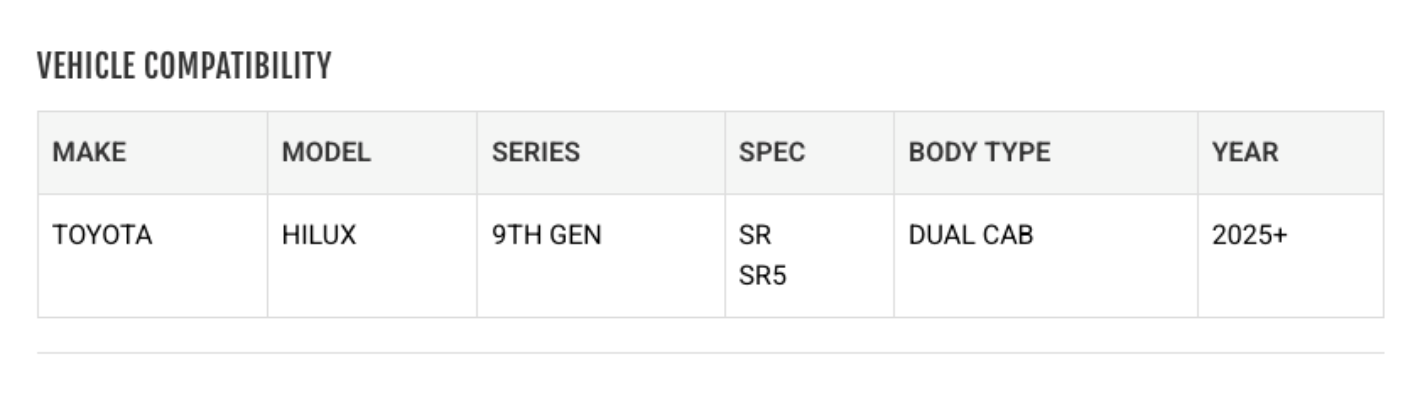
Once the vehicle fitment information was structured properly it became apparent that it could be used beyond the drop down filter.
It could also be used to display important fitment information on the product detail page. More clarification for customers and an improved shopping experience.
The result was one single source of truth, one thing to maintain and update, but multiple uses across the store.
The main takeaway I learned from this project was that clean architecture beats increasingly complicated workarounds.
Shopify tags aren’t bad, they were simply being used to represent a type of data that had outgrown them.
Moving the fitment information into structured Shopify data meant:
When an ecommerce store starts hitting platform limits, the answer isn't always another workaround. Sometimes the better solution is to rethink how the underlying data is structured.
If you're dealing with a Shopify store that's becoming difficult to manage because of product data, catalogue structure, fitment or other technical limitations.
I can help diagnose the problem and work out a practical way forward. Learn more about ways I can help improve your store.
Currently accepting new projects and technical troubleshooting.
Fill out the form below and I will get back to you within 2 business days.