Schedule a Shopify Theme Launch Natively (No Paid Apps)
If you’ve ever had to sit at your desk at midnight waiting to manually click 'Publish' just to take down a sale banner, you know how much of a pain it is.
Thankfully, there is now a better way to do it using Shopify’s native tools. Time to reclaim your sleep…
Ending a flash sale or holiday promotion can often mean logging into Shopify at midnight to manually remove banners.
Or, if you are a little prepared, you may have the changes already sitting in a draft theme ready to hit “Publish”. In other cases, you may even be paying for a third-party app just to schedule a theme swap.
Thankfully, there is now a better, native way to handle this. No apps, no fees. Introducing Shopify Rollouts.
Earlier this year, Shopify introduced Rollouts. You can find it under Markets > Rollouts within the Shopify admin.
It allows you to schedule changes for a specific date and time, choose whether those changes apply permanently or only for a set period, and even run A/B testing.
I recently had to remove some sales messaging and banners from a store - an ideal time to take it for a spin.
Note: At the time of writing, Rollouts is available on all plans (Basic and above), though the specific features available depend on your tier.
For this particular situation, the site already had sale messaging banners active across the home page, collections, and product detail pages.
Since it was a simple task of removing a few banners and sections, I chose to use a duplicate theme first. I prefer working in a draft theme, as it allows me to test changes and make sure everything works as expected before going live.
There are a few different ways Rollouts can be used, but I prefer this method because it gives you a separate version to test while keeping the live site completely untouched.
I created the duplicate theme 48 hours before the sale ended. That gave me plenty of time to check the post-sale version without disrupting the live store, while keeping the window short enough to avoid missing any late theme updates.
From here, follow these steps:
Edit and preview your draft: Open the draft theme and make your required changes. Remove the sale banner sections on the Home, Collection, and Product (PDP) pages, then preview the frontend to make sure everything looks right.
Navigate to Rollouts: Go to your admin sidebar and navigate to Markets > Rollouts.
Create your rollout: Click Create Rollout, give it a clear name (e.g., “Date - Remove Sale Banners”), and choose Launch for a permanent change.
Set the schedule: Under Scheduling, set your exact future date and time.
Select your theme: Under Changes, select Online Store, choose your clean draft theme, and click Apply.
Selecting your cleaned-up draft theme and setting the exact launch time
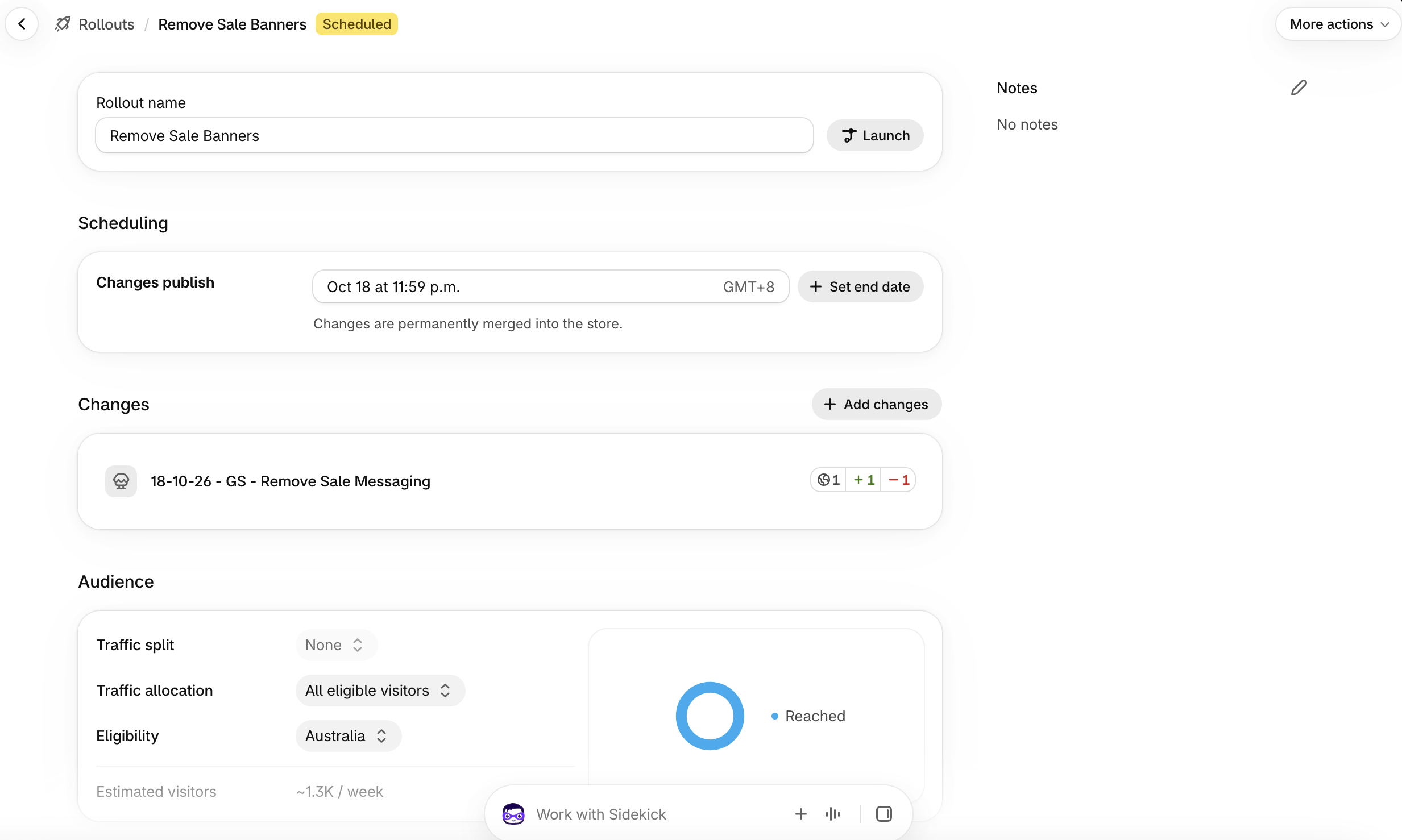
Once confirmed, the scheduled changes will appear in your Shopify admin.
Scheduled changes appearing in the Shopify admin under Markets > Rollouts
This workflow is ideal for a tight 48-to-72-hour window where you know no major structural theme changes are happening behind the scenes.
A common merchant fear when scheduling a draft theme days in advance is: “Am I freezing my entire store in time?”
Using this method does not affect global store data like your inventory, pricing, collections, or customer orders. It only affects the visual theme settings configured in the theme customiser.
By using a scheduled Launch, you are essentially taking a snapshot of your visual theme settings, making your required changes, and having them go live at a set date and time - all without having to do it manually at midnight.
To make sure you don’t accidentally overwrite your own work during longer promotions, follow these two rules:
Don’t duplicate too early: If you are running a 30-day sale, don’t create your clean draft on day one. Wait until two or three days before the sale ends to duplicate your live theme. This ensures your draft captures all recent site tweaks and updates.
Observe a “Theme Freeze”: Once you have created your clean draft theme and scheduled your launch, avoid making any other theme changes across the live site until after the Rollout has completed.
Using this simple method is a great way to ensure your promotional messaging comes down the exact minute a sale ends.
It gives you a true set-and-forget workflow. No manual out-of-hours updates, no third-party app fees, and most importantly, no more midnight alarms just to click publish.
If you’re looking to make practical improvements to your Shopify store or streamline how you manage updates without adding unnecessary apps, I can help diagnose what’s needed and scope out a clear way forward.
Currently accepting selected Shopify projects and e-commerce engagements.
Fill out the form below and I will get back to you within 2 business days.
Smaller, well-defined tasks can often be quoted directly.
More complex projects or technical issues may require an initial assessment or paid diagnostic before a quote can be provided.